HD TV Diagram

Resources Provided By MonsterCable.com
HD TV Diagram pdf
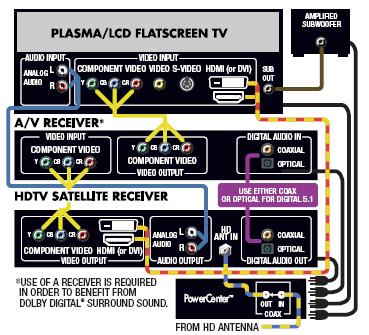
By following the HD TV Diagram..
• To get the highest resolution video (1080p), you need to use an HDMI cable, which carries both the video and audio signal. To get a lower resolution High Definition video (720p, 1080i), you need to use DVI or component video cables. S-Video or composite video connections should only be used when other video connections are not available.
• To get Dolby Digital® and DTS® surround sound, you need to use HDMI, fiber optic or coaxial digital audio cables.
• How far is your plasma from your video source? Make sure you get the right cable lengths.
Don't forget the number rule when connecting components to one another. When a component sends out a source, you connect to the out (output). When a component needs that source (such as a T.V) then you connect to the in (input).



|
|