Regular DVD Diagram for Standard DVD

Resources Provided By MonsterCable.com
Regular DVD Diagram pdf
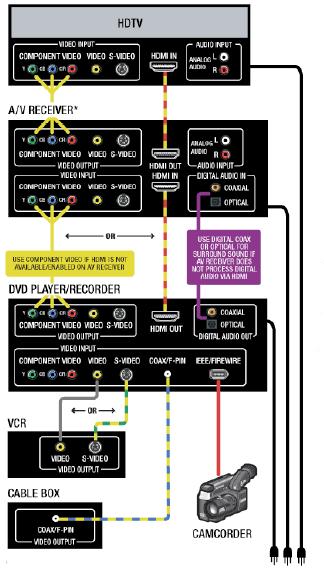
• The Regular DVD Diagram shows how the best quality video connection you can make from a DVD player is the HDMI connection. Many newer DVD players and recorders feature an HDMI connection -- if you've got it, and your TV and/or AV receiver can accept it, use this connection.
• The next best video connection you can make from a DVD player/recorder is a Component Video connection. Besides HDMI, this connection is the only way to enjoy the benefit of progressive-scan video from your DVD player, which results in a dramatically smoother, flicker-free picture.
• If neither HDMI nor Component Video is available on your DVD player, or if you have an older TV and/or A/V receiver, use an S-Video connection. You won't get the benefit of progressive scan picture, but the picture will still be clearer than connecting with basic Composite Video cable.
• Use the DVD player's HDMI, Fiber Optic or Digital Coax connection to send the audio from your player to the A/V receiver. This keeps the digital surround and stereo audio in its pure digital form for the receiver to process.



|
|